To print without the usual page header (title and URL) and footer (page number and timestamp) the header and footer needs to be cleared via the File | Page Setup... menu option in your browser (Firefox and Internet Explorer). This will, unfortunately, affect every page that is printed from your browser.
To get the default headers and footers back for subsequent pages, you will need to re-enter these details.
If using Opera, the headers and footers can simply be turned off under File | Print options.... Note that the Chrome browser does not currently offer the facility to edit the page headers and footers.
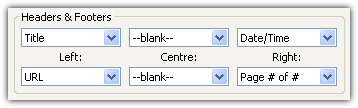
The default headers and footers options in Firefox / IE8 are:
In Internet Explorer 6 the default headers and footers are:
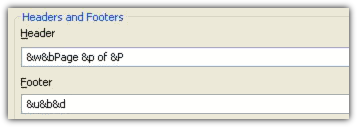
Cut 'n' Paste the header / footer from here...
/